How To Make Your Elf Shipping Label
Creating your custom DIY elf shipping label takes less than 5 minutes.
- Instant Download
Download the PDF with your Canva template link immediately after purchase.
- Open the PDF
Open the PDF file on a computer or mobile device and click the Canva template link. You will be prompted to create a Canva account, but it’s FREE and easy to do.
- Personalize at Home
Type your own text and add your own photos directly in the Canva online editor. Nothing needs to be installed.
- Print & Attach
Download your finished label as a PDF, print it on white paper or cardstock, cut it out and attach it to your elf’s arrival box or package.
- Scan & Open
Your child scans the QR code with a smartphone camera, taps “Click to authorize clearance,” and the Clearance Portal announces that the package can now be opened.
See how all five Santa Cam printables work together through December in my Santa Cam printables guide.
Ways to Use
How To Set Up Your Elf Arrival Box
- The night before:
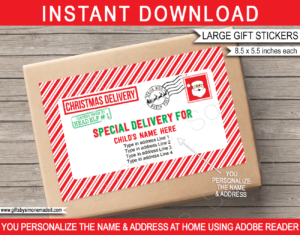
Pack your elf in a box or mailer (slightly crumpled makes it look like a real delivery) and attach your printed label. Use the “Contents” line to say what’s inside.
- Set the scene:
Leave the box by the front door, on the porch or under the tree so it looks as though it arrived overnight. A knock or doorbell ring before bed adds to the drama.
- Hand over the phone:
When your child finds it, let them scan the QR code and tap “Click to authorize clearance.” The Clearance Portal announces that the box can now be opened.
- Say it like it’s real:
Try, “A package from the North Pole just arrived, and it says it can’t be opened until you give it landing clearance.”
- Open it together:
Let the box hold whatever you listed on the label: your returning elf, a note, pajamas, treats or a book.
Finish the surprise with my Santa Cam & Elf Surveillance printables, or browse everything in Santa’s Workshop for Kids.
FAQs
Common questions about this elf shipping label template
How do I set up an elf arrival box?
Pack your elf in a box or mailer, attach the printed label and leave it by the door or under the tree. When your child finds it, they scan the QR code and tap “Click to authorize clearance” to open it.
Do I receive a physical label?
No. This is a digital Canva template. No physical item will be posted.
Can I edit the label in Canva?
Yes. You only need a 100% free Canva account to edit, personalize, and print this Elf label.
Do I need Canva Pro?
No. A free Canva account is enough to edit this template.
Do I need Adobe Reader for this version?
No. This template is designed exclusively for Canva. You do not need Adobe Acrobat or any desktop software.
Does the QR code on this Elf shipping label actually work?
Yes! The QR code on this Canva template is fully functional. When scanned with any smartphone camera, it opens a North Pole delivery confirmation message for your kids.
Does the QR code show my child’s name?
No. The QR code is the same for every buyer and opens a shared Clearance Portal webpage. It doesn’t display your child’s name or any details you edit on the label – it is a separate static website.
Can I use my own QR code?
Yes. You can replace my QR code with your own in Canva, for example one that links to a video message.
Can I print the label at home?
Yes. Download it as a PDF and print it at home on white paper or cardstock, or take it to a local print shop. The template includes layouts for one or two labels per US Letter page.
Is an A4 template included?
No. The supplied pages are US Letter size only. However they print out perfectly on A4 size paper if you print at “Actual” size.
Can I use it for other Christmas deliveries?
Yes. Edit the contents line and other text to suit a Christmas Eve box, a treat delivery or any other elf mail from the North Pole.





Reviews
There are no reviews yet.